
How we built protected search in Drupal using OpenSearch

Recently, we worked on a project for Catholic Schools NSW, where one of the key requirements was controlling access to content. Some pages and resources needed to be available only to authenticated users, while the rest of the site remained publicly accessible.
That requirement didn’t stop at the website itself, but it also extended to search. Authenticated users needed to see protected content in their results, while anonymous visitors should only see public content.
This presented an interesting challenge. In a decoupled architecture, search doesn’t automatically inherit Drupal’s access controls, so we needed a way to make search permission-aware without compromising performance. We used OpenSearch to build a solution that ensured users only saw content they were authorised to access, while keeping the search experience seamless.
Introduction:
In a traditional Drupal setup, this kind of requirement can be handled using entity access hooks. In our case, however, we were also building a decoupled search experience and content listing pages. Primarily, we index the content in OpenSearch, and eventually, the React App calls the OpenSearch endpoint to fetch the results.
The challenge with this approach is that once content is indexed in OpenSearch, there is no easy way to control access. Drupal is no longer responsible for deciding what a user can and can't see. The React application queries the OpenSearch index directly, so there isn't an opportunity to apply Drupal's native access checks before the results are returned.
Because the search application is fully decoupled, we needed a different approach to ensure users could only access content they were authorised to view.
To overcome this, we developed a solution that leverages two search API indexes. One indexes the content for the public, and another one for the protected content. The Search index that contains the protected content is protected with credentials. This index was accessible only via a custom Drupal module implementing middleware that had the required credentials.
This middleware was created using a Drupal controller to accept search requests for the protected content search from the decoupled front-end. The Drupal controller gets the request from the frontend, adds the credentials, and calls the protected OpenSearch index API’s endpoint.
Solution:
We divided the entire solution into three parts:
- Infrastructure and OpenSearch setup
- Drupal implementation
- Includes building a controller that works as the middleware.
- React applications can send requests to the controller to do a protected content search.
- Block implementation for the search block so we can place that in pages using the layout builder.
- Includes building a controller that works as the middleware.
- React implementation
OpenSearch setup
As we mentioned above, our approach was to create two search API indexes. One for each content type: a public index and a protected content index.
The overall setup looks like this;
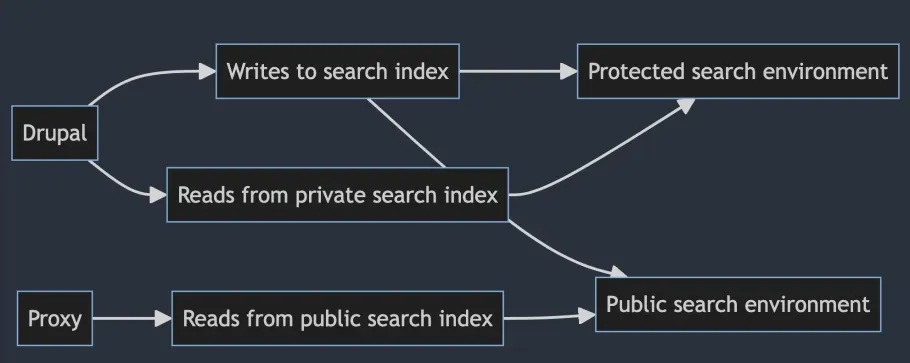
As we can see in the above diagram, Drupal writes to both the search indexes i.e, Public and Protected. When making the API query to perform the search, we use Drupal as a middleware. So, protected search requests will always pass through the Drupal controller and will be rerouted to a protected OpenSearch environment.
We made sure that only logged-in users could request search results via the middleware. This meant that CloudFront, our CDN of choice, could still serve anonymous search traffic. Next, we’ll look at how we decide which endpoint URL to send each request to - either directly to OpenSearch for the public index, or via the middleware for authenticated users.
Since our site runs on our platform Skpr, it was easy to spin up the above container setup.
To control the access to the OpenSearch indexes, we created two OpenSearch roles called reader_protected and reader_private
Just like with Drupal roles, we then assign an OpenSearch user to each role, and this controls reader access to each index.
Drupal setup
On the Drupal side, we built a Drupal block using a custom block plugin. This lets us place the search block using the layout builder.
We also built the middleware controller. This search controller works as an API endpoint for making requests to the protected search index.
Drupal block plugin
We use the Drupal block to attach the React application library and pass a few variables via drupalSettings. The React App then hydrates the markup that this block returns.
From the Drupal block plugin, we can pass the search API endpoint URL, depending on whether the user is logged in or not.
The React application uses this API URL to fetch the data from the OpenSearch container.
React implementation
The React JS application implemented for the search uses the endpoint URL passed from the Drupal block via drupalSettings. In the React code, we make search queries against the OpenSearch API endpoint passed in drupalSettings.
Controller implementation for the API
The above React application sends the request to the Drupal controller. This controller is responsible for making the requests to the protected search API index when the block is rendered for the authenticated users.
Here’s a small snippet of how it does the requests. Assuming we have a URL like api/v1/protected-search for logged-in user search, the controller looks like this:
$indexName = SearchIndexesEnum::PROTECTED_CONTENT_INDEX_ID->value;
$settings = Settings::get('search_index')[$indexName];


// Fetch the search query parameter.
$parameters = \array_intersect_key($request->query->all(), \array_flip(['source', 'source_content_type']));


$url = $this->getIndexUrl($indexName) . '?' . \http_build_query($parameters);
$options = [
 'auth' => [$settings['username'], $settings['password']],
 'headers' => [
   'Accept' => 'application/json',
   'Content-Type' => 'application/json',
 ],
];
$response = $this->elasticSearchClient->request($url, 'GET', $options);
Here, we are requesting a protected OpenSearch search index. We are fetching authentication credentials stored in the skpr config variables and passing them from variables defined in settings.php.
Conclusion
By using a dual-index strategy and introducing Drupal controller as middleware, we were able to effectively protect search results for authenticated users in a decoupled architecture. This approach allowed us to maintain performance and caching for public content while ensuring access control for protected content.
This approach helped us to keep the flexibility of React in building interactive search and filter pages, along with the flexibility of Drupal and search_api to index the content in OpenSearch in an effective manner.
Tagged
Related Articles

Introducing Drupal CMS: Content management for everyone
We’re all accustomed to Drupal's power, reliability, and security. Now, Drupal CMS is joining the fray. Its mission is to transform how businesses, marketers, and content creators build and manage impactful digital experiences.

Keywords to Context: Semantic Search and Retrieval-Augmented Generation with OpenSearch
Keyword search struggles with natural language and exploratory questions. Daniel walked the DrupalSouth 2026 audience through how OpenSearch and Skpr enable semantic search that understands intent and meaning, and how Retrieval-Augmented Generation (RAG) transforms results into clear, human-friendly answers grounded in your actual content.


Our contributions to Drupal 11.4 - and the 11.x journey so far
Drupal 11.4 is here. Several features landing in this cycle, and across the broader 11.x series, trace back to ideas we explored in contrib first. Worth noting too: Drupal major releases don't introduce new features. The real architectural work happens in the minors, and by the time 12.0 arrives, much of it will already be available, paving the way for the next series of improvements in 12.x.
Here's what we've been working on, and what else is worth knowing about.
