
How we implemented semantic search on GovCMS

We recently shipped semantic search on GovCMS for Cancer Australia, the national agency for cancer control. It's backed by OpenSearch and AWS Bedrock, with AI-generated answers layered on top of the results. Here's how we built it, and how it's hosted.
Why semantic search
Keyword search has a well-known limitation: it matches words, not meaning. A search for "space travel" can rank a workplace comedy above a genuine space film, just because the words overlap more often.
We covered the concepts behind this - embeddings, vector search, and hybrid scoring - in an earlier post: Semantic search: more than just keywords. This post picks up where that one left off and looks at what it took to bring semantic search into a real site hosted on GovCMS.
What we built
Cancer Australia's site holds a large body of clinical guidance, statistics, and publications. It’s exactly the kind of content where people search by topic or intent, not by the precise words the source document uses.
We added semantic search across the site's search experiences, global search, news listing, and publication search, using a hybrid query that blends semantic and keyword scoring so results reflect the intent behind a query. On top of that, users can generate an AI summary of their results on demand, a short, generated answer drawn from the same indexed content.
Architecture
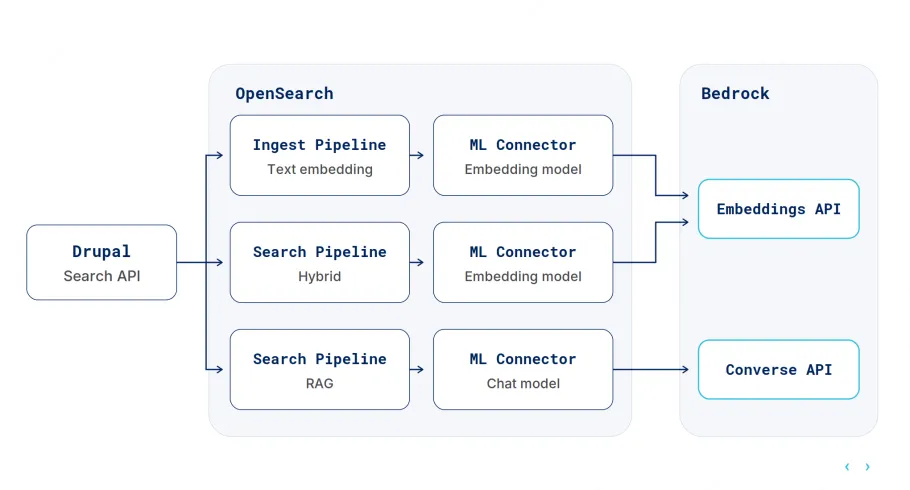
Search requests flow through Drupal's Search API, via the Search API OpenSearch and Search API OpenSearch Semantic modules, into OpenSearch. From there, OpenSearch's ML plugin talks to AWS Bedrock through two connectors:
- An embedding connector, which converts content and queries into vector representations.
- A converse connector, which generates the AI answer from the retrieved content.
These connectors are split across two search pipelines:
- One pipeline that blends vector and keyword scoring for the main hybrid search, and
- A second, retrieval-augmented generation (RAG) pipeline that only runs when a user asks for a summary.
Drupal calls each independently, without needing to know the details of either.
Hosting and infrastructure
Search infrastructure needs the same security rigour as the rest of the platform. Arguably more, since it now talks to a third-party AI provider.
Previously, OpenSearch ran as a standard container on GovCMS, using Lagoon's built-inopensearch service type. That's fine for keyword search, but it doesn't give us the OpenSearch ML plugin or a path to AWS Bedrock, both of which semantic search depends on.
So we moved OpenSearch off Lagoon's managed service type entirely, onto Amazon's managed OpenSearch service, which supports the ML plugin and Bedrock connectivity out of the box.
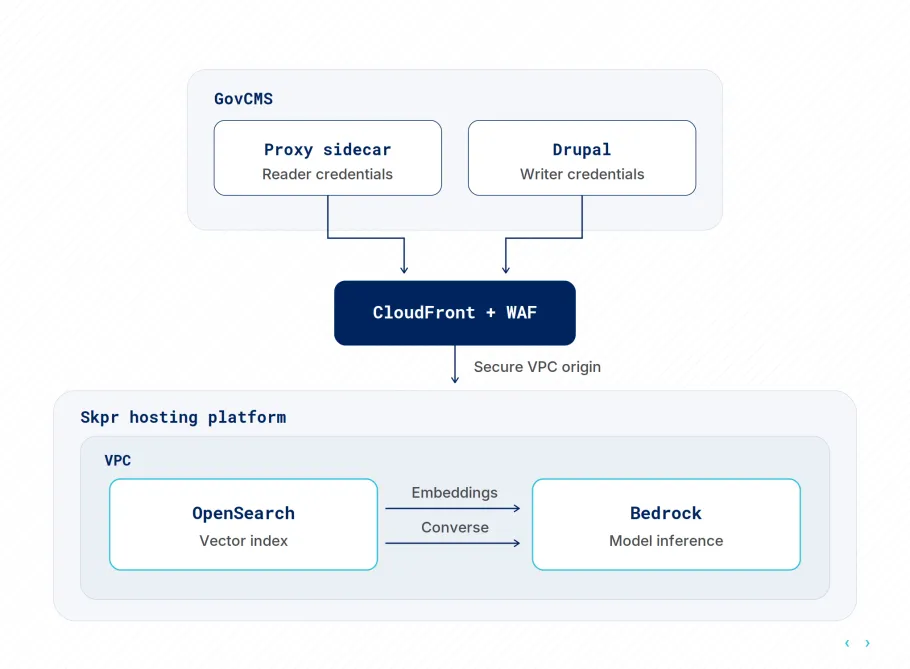
Our setup puts OpenSearch behind layers of network isolation:
- CloudFront and WAFsit in front of everything. Reader, Writer, and Admin access are all routed through the same edge, so traffic is filtered before it reaches application infrastructure.
- Inside the VPC, a protected subnet holds the Application Load Balancer. Its target group is managed dynamically by Lambda.
- OpenSearch itself lives in a private subnet, with no direct public exposure. The Bedrock connector setup (registering the embedding and converse models with OpenSearch) is also managed by Lambda, rather than baked into a deploy script with long-lived static credentials.
GovCMS itself is hosted on Lagoon, which builds the services running in production directly from our docker-compose.yml, so that file doubles as the production manifest.
With OpenSearch no longer a Lagoon-managed service, we needed a reliable bridge between the GovCMS application and OpenSearch, in both directions.
Previously, nginx proxied requests straight to OpenSearch with a single hardcoded Basic Auth header, meaning the same flat, read-only credential applied everywhere.
We replaced that with a dedicated proxy sidecar (built on Skpr's proxy-app) as its own service in the compose file. This sits between nginx and OpenSearch and handles that credential via configuration instead. Lagoon deploys the sidecar as an internal-only service, with no public route, keeping the bridge consistent between development and production.
The frontend experience
The frontend experience largely stayed the same. Search still returns a single, familiar result list; we didn't need to redesign the interface around semantic search.
Under the hood, that list comes from a hybrid query that combines scoring from semantic (vector) and keyword matches into a single ranked result set. From there, users can choose to generate an AI summary of those results.
Splitting it this way also helps performance. Retrieval-augmented generation (RAG) is slow compared to a search request, since it has to call out to an LLM. We didn't want that latency sitting in the way of the initial results. So we run two separate search pipelines:
- One pipeline for the hybrid search that returns immediately, and
- A second, RAG-specific pipeline that only runs when a user asks for a summary.
We also added some fancy animations using CSS keyframes to cover that second call, so it doesn't feel like the whole page is waiting on the LLM.
What we'd tell other agencies
A few things stood out from doing this in a government context:
- Keep the AI answer assistive, not authoritative. It sits alongside the real search results rather than replacing them. Someone senior remains responsible for how it's configured and monitored over time, in line with Australian Government AI guidelines.
- Don't let AI infrastructure become the exception to your security model. The Bedrock connectors get the same network isolation and credential handling as everything else, not a special case because they're new.
Contributing back
This work builds on Search API OpenSearch and Search API OpenSearch Semantic, both Drupal contrib modules. As part of this project, we contributed fixes and improvements back to both.
That's part of how we work: when we hit gaps in the tools we're using, we fix them upstream, so the next agency and the next client benefit too.
Related Articles

Semantic Search: More than just keywords
Keyword search can miss the mark. So instead, we turned to semantic and hybrid search, built with Drupal, OpenSearch and Skpr. The results were impressive.

Keywords to Context: Semantic Search and Retrieval-Augmented Generation with OpenSearch
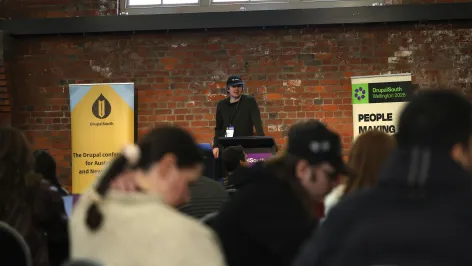
Keyword search struggles with natural language and exploratory questions. Daniel walked the DrupalSouth 2026 audience through how OpenSearch and Skpr enable semantic search that understands intent and meaning, and how Retrieval-Augmented Generation (RAG) transforms results into clear, human-friendly answers grounded in your actual content.
