
The Pinto Module - Efficient Theming for Front and Back End Developers

Traditional Drupal theming fragments logic, markup and styling across the stack. The Pinto module, built by PreviousNext, takes a component-first approach using object-oriented patterns, props, slots and full type safety to make reusing design system components fast and predictable.
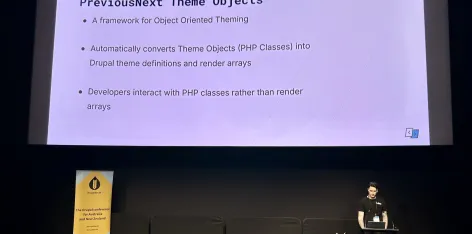
At DrupalSouth Wellington 2026, Adam Bramley (Lead Developer at PreviousNext and core subsystem maintainer for Block Content and Node modules) presented on the Pinto module — a PHP-first approach to component-based theming in Drupal that eliminates duplicated markup, reduces boilerplate, and encapsulates all rendering logic into a single location.
The Problem Pinto Solves
If you've worked on Drupal sites, this scenario will be familiar: your front end developer builds a new component in the design system, and you need to implement it in Drupal. You create a paragraph type or block content type, then use a mixture of Twig templates, field formatters, and preprocess hooks to replicate the design system markup as closely as possible. Maybe there are a couple of extra wrapping divs or unnecessary classes, but it works and you move on.
Then, a few years later, you come back to make a small change — maybe a button needs a new class — and it takes two hours to remember how everything fits together because the logic is scattered across three Twig templates, some YAML field formatter config, and a preprocess hook.
Pinto solves this by letting you reuse templates directly from your design system and consolidating all the rendering logic for a component into a single PHP class.
What is Pinto?
Originally written by Daniel Phin at PreviousNext, Pinto unlocks a new paradigm for theming Drupal sites. At its core, Pinto lets you define components as regular PHP classes. Theme variables (or slots/props) are strictly typed using native PHP typing, and Pinto handles all the heavy lifting to render them.
Key features include:
- Automatic theme hook generation — no manual hook_theme implementations needed
- Automatic library generation — CSS and JavaScript dependencies are created and attached automatically
- Zero lines of YAML — everything is defined in PHP
- Native PHP typing — real strict types, real enums, meaningful error assertions during development
- Cacheable metadata — automatically attached when rendering
- Design system integration — easily integrates with tools like Storybook to reuse templates directly
Pinto excels at lower-level component theming — atoms, molecules, and organisms in Atomic Design terms. For full page layout of content-manageable pages like nodes, Layout Builder is still the recommended approach, with Pinto rendering the individual components within the page. There is also a Pinto Layout module for defining layout plugins as Pinto components. Form rendering is not currently supported.
How to Use Pinto
There is a simple three-step process to use Pinto: create a component, register it, and use it.
Step 1: Create a Component
A Pinto component is a PHP class where each constructor parameter maps to a Twig template variable. For example, a "Featured Content" component with a content area, an image, a reverse toggle, and a one-third width toggle would have four constructor parameters. The #[Slots] attribute at the top of the class tells Pinto to register each constructor parameter as a theme variable. The class uses the DrupalInvokableSlotsTrait from Pinto, which handles converting the component into a render array, mapping constructor parameters to theme variables, and attaching libraries and cacheable metadata.
Step 2: Register the Component
Pinto discovers components via an enum list by default. Each case in the enum maps to a single component class using the #[Definition] attribute. You can add custom attributes for Storybook integration (pointing to the template location) and asset declarations (CSS and JavaScript files). Pinto will automatically create libraries from these declarations. There is also an SDC-style discovery mode using a trait if you prefer the single-directory-component layout where everything related to a component is encapsulated in one directory.
Step 3: Use the Component
Rendering a component is straightforward: create a new instance of the class with the required parameters, then invoke it (call the object as a function using PHP's __invoke() magic method). The result is a Drupal render array with the theme definition, variables, attached libraries, and cache metadata — all generated automatically. You can use Pinto components anywhere Drupal supports render arrays: controllers, block plugins, field formatters, and more.
Storybook Integration
At PreviousNext, Storybook is used on basically every project with a custom theme. Front end developers build and document components in Storybook in isolation — no requirement for them to interact with or understand Drupal. Clients can play with and test components before anything is built in Drupal.
The integration works by placing a components directory at the root of the repository, using the Components Drupal module to define a custom Twig namespace pointing to that directory, and then using an attribute on the Pinto enum definition to wire the component to its Storybook template location. This means the design system is the source of truth, and Drupal simply consumes the templates.
This approach was used to build the entire Cancer Australia website from the ground up using Pinto and Storybook.
Entity Rendering with Pinto
Entity rendering is where Pinto really shines. Instead of messing around with display settings or overriding Twig templates, you wire up the component and you're set. Two companion modules facilitate this:
- Bundle Class View Builder (BCVB) — if a bundle class implements the
BuildableEntityInterface, entity rendering is diverted to a build method on the class - Pinto Entity — uses an
#[EntityView]attribute on a method in the bundle class to define how an entity renders for specific view modes
Both modules are essentially zero-config. If either module's method doesn't return a build, rendering falls back to normal Drupal behaviour, which is useful for things like media library view modes where you don't need custom rendering.
A practical pattern is to define a factory method on the Pinto component class that translates an entity into the component. This means the component knows how to build itself from an entity. Because bundle classes and traits can be shared, the same component can be reused across both paragraph and block content entities without duplicating any rendering logic.
Compared to core's entity view builder — which involves gathering entity view displays, calling field formatters, running preprocess and alter hooks, and potentially building Layout Builder sections — the Pinto rendering path is much simpler: invoke the Pinto object, render the component, output markup.
Why Not Single Directory Components (SDCs)?
Adam addressed the comparison with Drupal core's SDCs directly:
- Definition format: SDCs use YAML (easy to mess up), while Pinto uses PHP with the full power of the language
- Type system: SDCs use JSON Schema for prop types (not validated at render time), while Pinto uses native PHP strict typing with meaningful assertions during development
- Rendering: SDCs require manually creating render arrays or using Twig embeds (nesting gets messy), while Pinto components are rendered by simply invoking the object
- Storybook: The SDC Storybook integration works backwards — SDCs must live in Drupal modules/themes and Storybook consumes from Drupal. With Pinto, Storybook is the source of truth and Drupal consumes from it
- Asset flexibility: SDCs require a single CSS and single JS file named the same as the component in the same directory. Pinto has a flexible asset system that supports multiple files from anywhere, with validation that the assets exist
- Template location: SDC templates must live in modules or themes. Pinto templates can live anywhere
For those who do prefer the SDC-style organisation, Pinto also supports an SDC discovery mode, and both approaches can be used together.
Roadmap
The main item on the Pinto roadmap is Canvas integration. Canvas is tightly coupled to SDCs, and there have been some speed bumps and API changes along the way, but a working integration exists and is expected to be released to the community later this year. Beyond that, the focus is on continued developer experience improvements and reducing boilerplate with each release.
Resources
- Pinto documentation
- Quick start guide
- PreviousNext blog posts on Pinto
- Pinto Entity module
- Bundle Class View Builder module
- Bundle Class Attributes module
- Watch the full talk on YouTube
Photo credit: Karl Hepworth - https://www.flickr.com/people/200855369@N08/
License: ShareAlike 2.0 - https://creativecommons.org/licenses/by-sa/2.0/deed.en
Related Articles
Video: Object oriented theming with Pinto
The new Pinto module elevates your Drupal theming. Written by PreviousNext’s Daniel Phin, it introduces a new, structured way for theming in Drupal and is used in all our latest projects.

PreviousNext wins four Splash Awards and a third consecutive Best in Show at DrupalSouth Wellington 2026
Last week, the PreviousNext team headed over to Wellington for DrupalSouth 2026, and what a week it was.

Entity theming with Pinto
Learn how to make entity theming a breeze using the Pinto module. If you haven’t already, check out the first part of this series for an introduction to all things Pinto.